Control Plane Topologies
This feature is in private preview for select customers in Upbound Spaces. If you're interested in this deployment mode, contact Upbound.
Upbound's Control Plane Topology feature lets you build and deploy a platform of multiple control planes. These control planes work together for a unified platform experience.
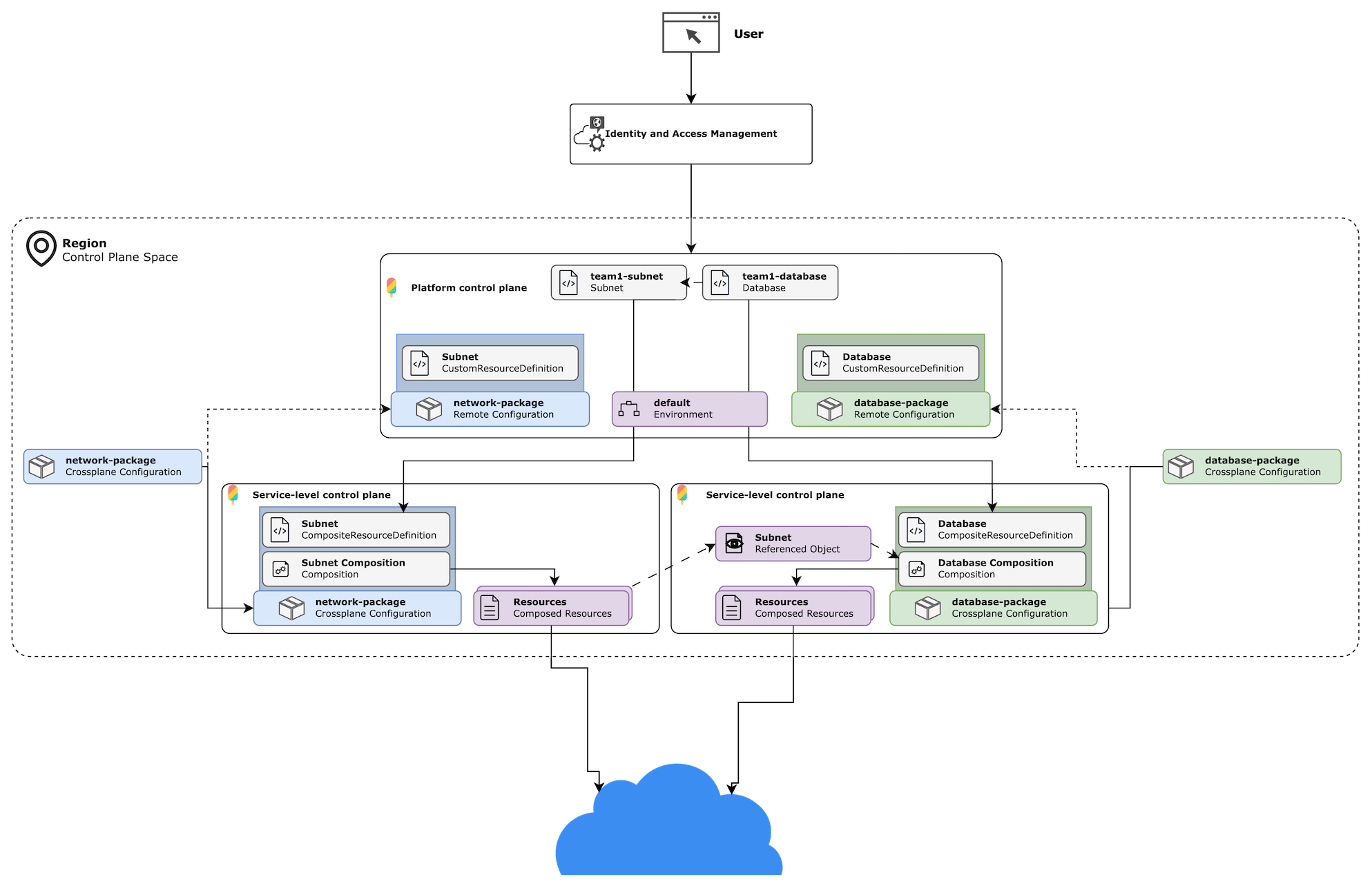
With the Topology feature, you can install resource APIs that other control planes reconcile and configure the routing between them. You can also build compositions that reference other resources running on your control plane or elsewhere in Upbound.
This guide explains how to use Control Plane Topology APIs to install, configure remote APIs, and build powerful compositions that reference other resources.
Benefits
The Control Plane Topology feature provides the following benefits:
- Decouple your platform architecture into independent offerings to improve your platform's software development lifecycle.
- Install composite APIs from Configurations as CRDs that other control planes fulfill and reconcile.
- Route APIs to other control planes by configuring an Environment resource, which define a set of routable dimensions.
How it works
Imagine the scenario where you want to let a user reference a subnet when creating a database instance. To your control plane, the kind: database and kind: subnet are independent resources. To you as the composition author, these resources have an important relationship. It may be that:
- you don't want your user to ever be able to create a database without specifying a subnet.
- you want to let them create a subnet when they create the database, if it doesn't exist.
- you want to allow them to reuse a subnet that got created elsewhere or gets shared by another user.
In each of these scenarios, you must resort to writing complex composition logic to handle each case. The problem worsens when the resource exists in a context separate from the current control plane's context. Imagine a scenario where one control plane manages Database resources and a second control plane manages networking resources. With the Topology feature, you can offload these concerns to Upbound machinery.
Prerequisites
Enable the Control Plane Topology feature in the Space you plan to run your control plane in:
- Cloud Spaces: Not available yet
- Connected Spaces: Space administrator must enable this feature
- Disconnected Spaces: Space administrator must enable this feature
Compose resources with ReferencedObjects
ReferencedObject is a resource type available in an Upbound control plane that lets you reference other Kubernetes resources in Upbound.
This feature is useful for composing resources that exist in a remote context, like another control plane. You can also use ReferencedObjects to resolve references to any other Kubernetes object in the current control plane context. This could be a secret, another Crossplane resource, or more.
Declare the resource reference in your XRD
To compose a ReferencedObject, you should start by adding a resource reference in your Composite Resource Definition (XRD). The convention for the resource reference follows the shape shown below:
<resource>Ref:
  type: object
  properties:
    apiVersion:
      type: string
      default: "<apiVersion-of-resource>"
      enum: [ "<apiVersion-of-resource>" ]
    kind:
      type: string
      default: "<resource-ref-kind>"
      enum: [ "<resource-ref-kind>" ]
    grants:
      type: array
      default: [ "Observe" ]
      items:
        type: string
        enum: [ "Observe", "Create", "Update", "Delete", "*" ]
    name:
      type: string
    namespace:
      type: string
  required:
  - name
The <resource>Ref should be the kind of resource you want to reference. The apiVersion and kind should be the associated API version and kind of the resource you want to reference.
The name and namespace strings are inputs that let your users specify the resource instance.
Grants
The grants field is a special array that lets you give users the power to influence the behavior of the referenced resource. You can configure which of the available grants you let your user select and which it defaults to. Similar in behavior as Crossplane management policies, each grant value does the following:
- Observe: The composite may observe the state of the referenced resource.
- Create: The composite may create the referenced resource if it doesn't exist.
- Update: The composite may update the referenced resource.
- Delete: The composite may delete the referenced resource.
- *: The composite has full control over the referenced resource.
Here are some examples that show how it looks in practice:
Show example for defining the reference to another composite resource
apiVersion: apiextensions.crossplane.io/v1
kind: CompositeResourceDefinition
metadata:
  name: xsqlinstances.database.platform.upbound.io
spec:
  type: object
  properties:
    parameters:
      type: object
      properties:
          networkRef:
            type: object
            properties:
              apiVersion:
                type: string
                default: "networking.platform.upbound.io"
                enum: [ "networking.platform.upbound.io" ]
              grants:
                type: array
                default: [ "Observe" ]
                items:
                  type: string
                  enum: [ "Observe" ]
              kind:
                type: string
                default: "Network"
                enum: [ "Network" ]
              name:
                type: string
              namespace:
                type: string
            required:
            - name
Show example for defining the reference to a secret
apiVersion: apiextensions.crossplane.io/v1
kind: CompositeResourceDefinition
metadata:
  name: xsqlinstances.database.platform.upbound.io
spec:
  type: object
  properties:
    parameters:
      type: object
      properties:
          secretRef:
            type: object
            properties:
              apiVersion:
                type: string
                default: "v1"
                enum: [ "v1" ]
              grants:
                type: array
                default: [ "Observe" ]
                items:
                  type: string
                  enum: [ "Observe", "Create", "Update", "Delete", "*" ]
              kind:
                type: string
                default: "Secret"
                enum: [ "Secret" ]
              name:
                type: string
              namespace:
                type: string
            required:
            - name
Manually add the jsonPath
This step is a known limitation of the preview. Upbound is working on tooling that removes this requirement.
During the preview timeframe of this feature, you must add an annotation by hand
to the XRD. In your XRD's metadata.annotations, set the
references.upbound.io/schema annotation. It should be a JSON string in the
following format:
{
    "apiVersion": "references.upbound.io/v1alpha1",
    "kind": "ReferenceSchema",
    "references": [
        {
            "jsonPath": ".spec.parameters.secretRef",
            "kinds": [
                {
                    "apiVersion": "v1",
                    "kind": "Secret"
                }
            ]
        }
    ]
}
Flatten this JSON into a string and set the annotation on your XRD. View the example below for an illustration:
Show example setting the references.upbound.io/schema annotation
apiVersion: apiextensions.crossplane.io/v1
kind: CompositeResourceDefinition
metadata:
  name: xthings.networking.acme.com
  annotations:
    references.upbound.io/schema: '{"apiVersion":"references.upbound.io/v1alpha1","kind":"ReferenceSchema","references":[{"jsonPath":".spec.secretRef","kinds":[{"apiVersion":"v1","kind":"Secret"}]},{"jsonPath":".spec.configMapRef","kinds":[{"apiVersion":"v1","kind":"ConfigMap"}]}]}'
Show example for setting multiples references in the references.upbound.io/schema annotation
apiVersion: apiextensions.crossplane.io/v1
kind: CompositeResourceDefinition
metadata:
  name: xthings.networking.acme.com
  annotations:
    references.upbound.io/schema: '{"apiVersion":"references.upbound.io/v1alpha1","kind":"ReferenceSchema","references":[{"jsonPath":".spec.parameters.secretRef","kinds":[{"apiVersion":"v1","kind":"Secret"}]},{"jsonPath":".spec.parameters.configMapRef","kinds":[{"apiVersion":"v1","kind":"ConfigMap"}]}]}'
You can use a VSCode extension like vscode-pretty-json to make this task easier.
Compose a ReferencedObject
To pair with the resource reference declared in your XRD, you must compose the referenced resource. Use the ReferencedObject resource type to bring the resource into your composition. ReferencedObject has the following schema:
apiVersion: references.upbound.io/v1alpha1
kind: ReferencedObject
spec:
  managementPolicies:
  - Observe
  deletionPolicy: Orphan
  composite:
    apiVersion: <composite-apiVersion>
    kind: <composite-kind>
    name: <composite-instance-name>
    jsonPath: .spec.parameters.secretRef
The spec.composite.apiVersion and spec.composite.kind should match the API version and kind of the compositeTypeRef declared in your composition. The spec.composite.name should be the name of the composite resource instance.
The spec.composite.jsonPath should be the path to the root of the resource ref you declared in your XRD.
Show example for composing a resource reference to a secret
apiVersion: apiextensions.crossplane.io/v1
kind: Composition
metadata:
  name: demo-composition
spec:
  compositeTypeRef:
    apiVersion: networking.acme.com/v1alpha1
    kind: XThing
  mode: Pipeline
  pipeline:
  - step: patch-and-transform
    functionRef:
      name: crossplane-contrib-function-patch-and-transform
    input:
      apiVersion: pt.fn.crossplane.io/v1beta1
      kind: Resources
      resources:
      - name: secret-ref-object
        base:
          apiVersion: references.upbound.io/v1alpha1
          kind: ReferencedObject
          spec:
            managementPolicies:
            - Observe
            deletionPolicy: Orphan
            composite:
              apiVersion: networking.acme.com/v1alpha1
              kind: XThing
              name: TO_BE_PATCHED
              jsonPath: .spec.parameters.secretRef
        patches:
        - type: FromCompositeFieldPath
          fromFieldPath: metadata.name
          toFieldPath: spec.composite.name
By declaring a resource reference in your XRD, Upbound handles resolution of the desired resource.
Deploy APIs
To configure routing resource requests between control planes, you need to deploy APIs in at least two control planes.
Deploy into a service-level control plane
Package the APIs you build into a Configuration package and deploy it on a control plane in an Upbound Space. In Upbound, you call the control plane hosting the Configuration package a service-level control plane. This control plane runs the controllers that process the API requests and provision underlying resources. Later sections explain how to use Topology features to configure routing.
Deploy as Remote APIs on a platform control plane
Use the same package source as the service-level control planes, but now deploy the Configuration in a separate control plane as a RemoteConfiguration. The RemoteConfiguration installs Kubernetes CustomResourceDefinitions for the APIs defined in the Configuration package, but no controllers get deployed.
Install a RemoteConfiguration
RemoteConfiguration is a resource type available in an Upbound manage control planes that acts like a sort of Crossplane Configuration package. Unlike standard Crossplane Configurations, which install XRDs, compositions, and functions into a desired control plane, RemoteConfigurations install only the CRDs for claimable composite resource types.
Install directly
Install a RemoteConfiguration by defining the following and applying it to your control plane:
apiVersion: pkg.upbound.io/v1alpha1
kind: RemoteConfiguration
metadata:
  name: <your-configuration-name>
spec:
  package: <xpkg.upbound.io/your-org/your-configuration-name:tag>
Declare as a project dependency
You can declare RemoteConfigurations as dependencies in your control plane's
project file. Use the up CLI to add the dependency, providing
the --remote flag:
up dep add <xpkg.upbound.io/your-org/your-configuration-name:tag> --remote
This command adds a declaration in the spec.apiDependencies stanza of your
project's upbound.yaml as demonstrated below:
apiVersion: meta.dev.upbound.io/v1alpha1
kind: Project
metadata:
  name: service-controlplane
spec:
  apiDependencies:
  - configuration: xpkg.upbound.io/upbound/remote-configuration
    version: '>=v0.0.0'
  dependsOn:
  - provider: xpkg.upbound.io/upbound/provider-kubernetes
    version: '>=v0.0.0'
Like a Configuration, a RemoteConfigurationRevision gets created when the
package gets installed on a control plane. Unlike Configurations, XRDs and
compositions don't get installed by a RemoteConfiguration. Only the CRDs
for claimable composite types get installed and Crossplane thereafter manages
their lifecycle. You can tell when a CRD gets installed by a
RemoteConfiguration because it has the internal.scheduling.upbound.io/remote: true label:
apiVersion: apiextensions.k8s.io/v1
kind: CustomResourceDefinition
metadata:
  name: things.networking.acme.com
  labels:
    internal.scheduling.upbound.io/remote: "true"
Use an Environment to route resources
Environment is a namespace-scoped resource type that works with resources deployed with RemoteConfigurations. It allows you to configure how to route remote resources to other control planes by a set of user-defined dimensions.
Define a routing dimension
To establish a routing dimensions between two control planes, you must do two things:
- Annotate the service control plane with the name and value of a dimension.
- Configure an environment on another control plane with a dimension matching the field and value of the service control plane.
The example below demonstrates the creation of a service control plane with a
region dimension:
apiVersion: spaces.upbound.io/v1beta1
kind: ControlPlane
metadata:
  labels:
    dimension.scheduling.upbound.io/region: "us-east-1"
  name: prod-1
  namespace: default
spec:
Upbound's Spaces controller keeps an inventory of all declared dimensions and listens for control planes to route to them.
Create an Environment
Next, create an Environment on a separate control plane, referencing the
dimension from before. The example below demonstrates routing all remote
resource requests in the default namespace of the control plane based on a
single region dimension:
apiVersion: scheduling.upbound.io/v1alpha1
kind: Environment
metadata:
  name: default
  namespace: default
spec:
  dimensions:
    region: us-east-1
You can specify whichever dimensions as you want. The example below demonstrates multiple dimensions:
apiVersion: scheduling.upbound.io/v1alpha1
kind: Environment
metadata:
  name: default
  namespace: default
spec:
  dimensions:
    region: us-east-1
    env: prod
    offering: databases
In order for the routing controller to match, all dimensions must match for a given service control plane.
You can specify dimension overrides on a per-resource group basis. This lets you configure default routing rules for a given Environment and override routing on a per-offering basis.
apiVersion: scheduling.upbound.io/v1alpha1
kind: Environment
metadata:
  name: default
  namespace: default
spec:
  dimensions:
    region: us-east-1
  resourceGroups:
    - name: database.platform.upbound.io # database
      dimensions:
        region: "us-east-1"
        env: "prod"
        offering: "databases"
    - name: networking.platform.upbound.io # networks
      dimensions:
        region: "us-east-1"
        env: "prod"
        offering: "networks"
Confirm the configured route
After you create an Environment on a control plane, the routes selected get
reported in the Environment's .status.resourceGroups. The following example
demonstrates this:
apiVersion: scheduling.upbound.io/v1alpha1
kind: Environment
metadata:
  name: default
...
status:
  resourceGroups:
    - name: database.platform.upbound.io # database
      proposed:
        controlPlane: ctp-1
        group: default
        space: upbound-gcp-us-central1
      dimensions:
        region: "us-east-1"
        env: "prod"
        offering: "databases"
If you don't see a response in the .status.resourceGroups, this indicates a
match wasn't found or an error establishing routing occurred.
There's no limit to the number of control planes you can route to. You can also stack routing and form your own topology of control planes, with multiple layers of routing.
Limitations
Routing from one control plane to another is currently scoped to control planes that exist in a single Space. You can't route resource requests to control planes that exist on a cross-Space boundary.